Fueling your journey to inspire, overcome, and motivate towards a brighter future. Join us today
Log In
Sign Up
Don’t have an account yet? Sign Up
Already have an account? Sign In
By signing up, I accept IOMH (Terms & Conditions)
Challenge yourself: Can you convert your videos into globally available content with professional-grade transcription and captioning methods?
Enrolled Students: 6
Join our Transcription and Captioning course and discover your hidden skills, setting you on a path to success in this area. Get ready to improve your skills and achieve your biggest goals. The Transcription and Captioning course has everything you need to get a great start in this sector.
Improving and moving forward is key to getting ahead personally. The Transcription and Captioning course is designed to teach you the important stuff quickly and well, helping you to get off to a great start in the field. So, what are you looking for? Enrol now!
This course covers the topic you must know to stand against the tough competition. The future is truly yours to seize with this Transcription and Captioning. Enrol today and complete the course to achieve a certificate that can change your career forever.
After studying the course, an MCQ exam or assignment will test your skills and knowledge. You have to get a score of 60% to pass the test and get your certificate.
Certificate of Completion – Digital / PDF Certificate
After completing the Transcription and Captioning course, you can order your CPD Accredited Digital/ PDF Certificate for £5.99.
Certificate of Completion – Hard copy Certificate
You can get the CPD Accredited Hard Copy Certificate for £12.99.
Inside the UK: £3.99
International: £10.99
This Transcription and Captioning is suitable for anyone aspiring to start a career in relevant field; even if you are new to this and have no prior knowledge, this course is going to be very easy for you to understand.
On the other hand, if you are already working in this sector, this course will be a great source of knowledge for you to improve your existing skills and take them to the next level.
This course has been developed with maximum flexibility and accessibility, making it ideal for people who don’t have the time to devote to traditional education.
You don’t need any educational qualification or experience to enrol in the Transcription and Captioning course.
Do note: you must be at least 16 years old to enrol.
Any internet-connected device, such as a computer, tablet, or smartphone, can access this online course.
The certification and skills you get from this Transcription and Captioning Course can help you advance your career and gain expertise in several fields, allowing you to apply for high-paying jobs in related sectors.
1. You need to find the right course on our IOMH website at first. You can search for any course or find the course from the Courses section of our website.
2. Click on Take This Course button, and you will be directed to the Cart page.
3. You can update the course quantity and also remove any unwanted items in the CART and after that click on the Checkout option and enter your billing details.
4. Once the payment is made, you will receive an email with the login credentials, and you can start learning after logging into the portal.
After purchasing the course, you should receive an email with the login credentials within 24 hours. Please check your spam or junk folder if you didn’t receive it in your inbox. You can access your courses by logging into your account. If you still need any assistance, please get in touch with our Customer Support team by providing the details of your purchase.
You should receive your Digital Certificate within 24 hours after placing the order, and it will take 3-9 days to deliver the hard copies to your address if you are in the UK.
For International Delivery, it will take 20-25 days.
If you require any assistance, get in touch with our dedicated Customer Support team, and your queries/issues will be dealt with accordingly.
You can make the payment using PayPal or you can Bank Transfer the amount.
For Bank transfer you will require an invoice from us and you need to contact our Customer Support team and provide details of your purchase to get the invoice.
After that, you will receive an email with the invoice and bank details and you can make the payment accordingly.
We are an online course provider, and learners from anywhere in the world can enrol on our courses using an internet-connected device.
To resolve this issue, please log out of your account and then log back in.
| Module 01: Introduction - What It's All About | |||
| Definition: Captions | 00:02:00 | ||
| Subtitling in Practice | 00:05:00 | ||
| Workflow for Captioning Videos | 00:04:00 | ||
| Module 02: Theory - About Subtitles and Closed Captions | |||
| Theory: Overview | 00:02:00 | ||
| Motivation: Benefits of Subtitles and Captions | 00:05:00 | ||
| Differences Between Subtitles and Captions | 00:04:00 | ||
| The Most Important Subtitle Formats | 00:06:00 | ||
| Module 03: Guidelines - Nice and Clean Captions | |||
| Language: Pay Attention to Spelling, Grammar and Punctuation | 00:03:00 | ||
| Style Guidelines: How to Create Great Captions | 00:06:00 | ||
| Example and Discussion: Good and Bad Captions | 00:04:00 | ||
| Module 04: Preparation - Transcribe Your Video | |||
| Preparation: Overview | 00:02:00 | ||
| Definition: Transcription | 00:01:00 | ||
| Reasons for Transcription | 00:04:00 | ||
| The Other Way Around: Convert Captions to Plain Text | 00:02:00 | ||
| Tools for Transcribing Videos | 00:04:00 | ||
| Module 05: The Offline Way - Manually Prepare Captions With Desktop Tools | |||
| The Offline Way: Overview | 00:03:00 | ||
| Benefits of Captioning Software | 00:04:00 | ||
| Subtitle Edit | 00:07:00 | ||
| Tip: Adjust Timings | 00:02:00 | ||
| Tip: Convert Subtitles | 00:01:00 | ||
| Aegisub Advanced Subtitle Editor | 00:06:00 | ||
| Other Programs to Create Subtitles | 00:04:00 | ||
| Module 06: The Subtitle Track - Integrate Captions into Your Video File | |||
| The Subtitle Track: Overview | 00:02:00 | ||
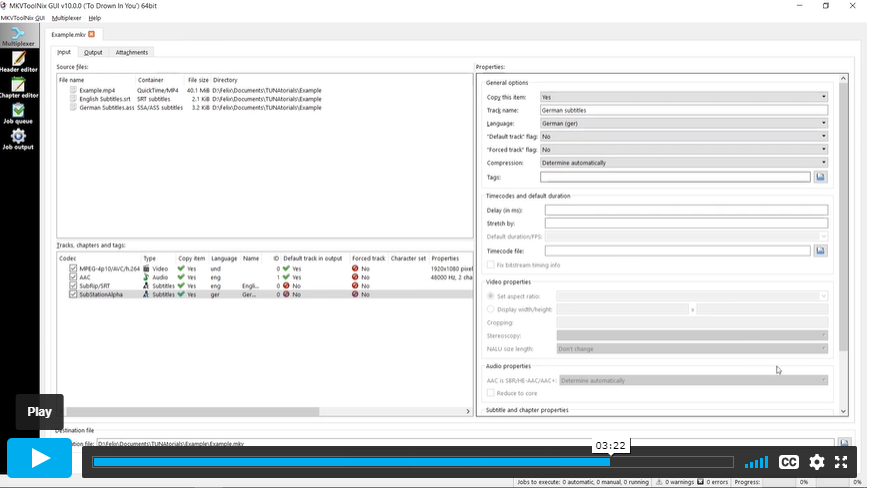
| How to Add Captions to MKV Videos | 00:04:00 | ||
| How to Add Captions to MP4 Videos | 00:03:00 | ||
| How to Use Captions With the VLC media player | 00:05:00 | ||
| Open Captions Vs. Closed Captions | 00:06:00 | ||
| Tip: The Other Way Round: Extract Captions From Videos | 00:02:00 | ||
| Module 07: The Online Way - Caption Videos Manually and Automatically Online | |||
| The Online Way: Overview | 00:02:00 | ||
| YouTube: Create, Edit and Add Captions to Your Videos | 00:04:00 | ||
| Subtitling Platforms | 00:04:00 | ||
| Download Subtitles for Any YouTube Video | 00:02:00 | ||
| Module 08: Translation - Appeal to Your International Audience | |||
| Translation: Overview | 00:02:00 | ||
| Motivation: Translate Videos into Many Different Languages Using Captions | 00:03:00 | ||
| The Translation Procedure: Translate Transcriptions, Not Captions! | 00:03:00 | ||
| Online Translation Tools | 00:04:00 | ||
| Module 09: The End - What Did You Learn? | |||
| Summary of the Course | 00:05:00 | ||
Save Up To 95% -
This course includes:
4.7 (8 reviews)
365 days
27 Students
4.7 (8 reviews)
365 days
28 Students
COPYRIGHT © 2021 Institute of Mental Health